Advertisement
Home Blog Page 27

Reeder 3: The Best RSS Reader for iOS

Reeder 3 for iPad is a great RSS app which allows you to synchronise your RSS feeds from different web apps such as Feedly and Inoreader, as well as a local sync.


Reeder 3 allows you to check your feeds from different services such as Feedly, Feedbin, Inoreader and many others. You can also use local sync if you do not have a web account. It also connects with Instapaper and Readability, which allows you to save articles for later.

Reeder checks your feeds when you go on the app, and then caches them. This allows you to read your feeds offline. You can mark as a article as favorite, and then tap on the star at the bottom to see all the articles marked as favorite; allowing you to quickly save articles you like.

The main reason I got Reeder is the ability to save articles to Evernote. I use Feedly, and you have to pay for a premium account to get the ability to save articles to services. I decided to invest in Reeder which would allow me to save my articles to Evernote. Reeder 3 costs £3.99, which is certainly worth it. When the app downloads and you open it, you can sign into your account(s), and then the app automatically fetches the feeds. You can also choose to only use local RSS feeds.

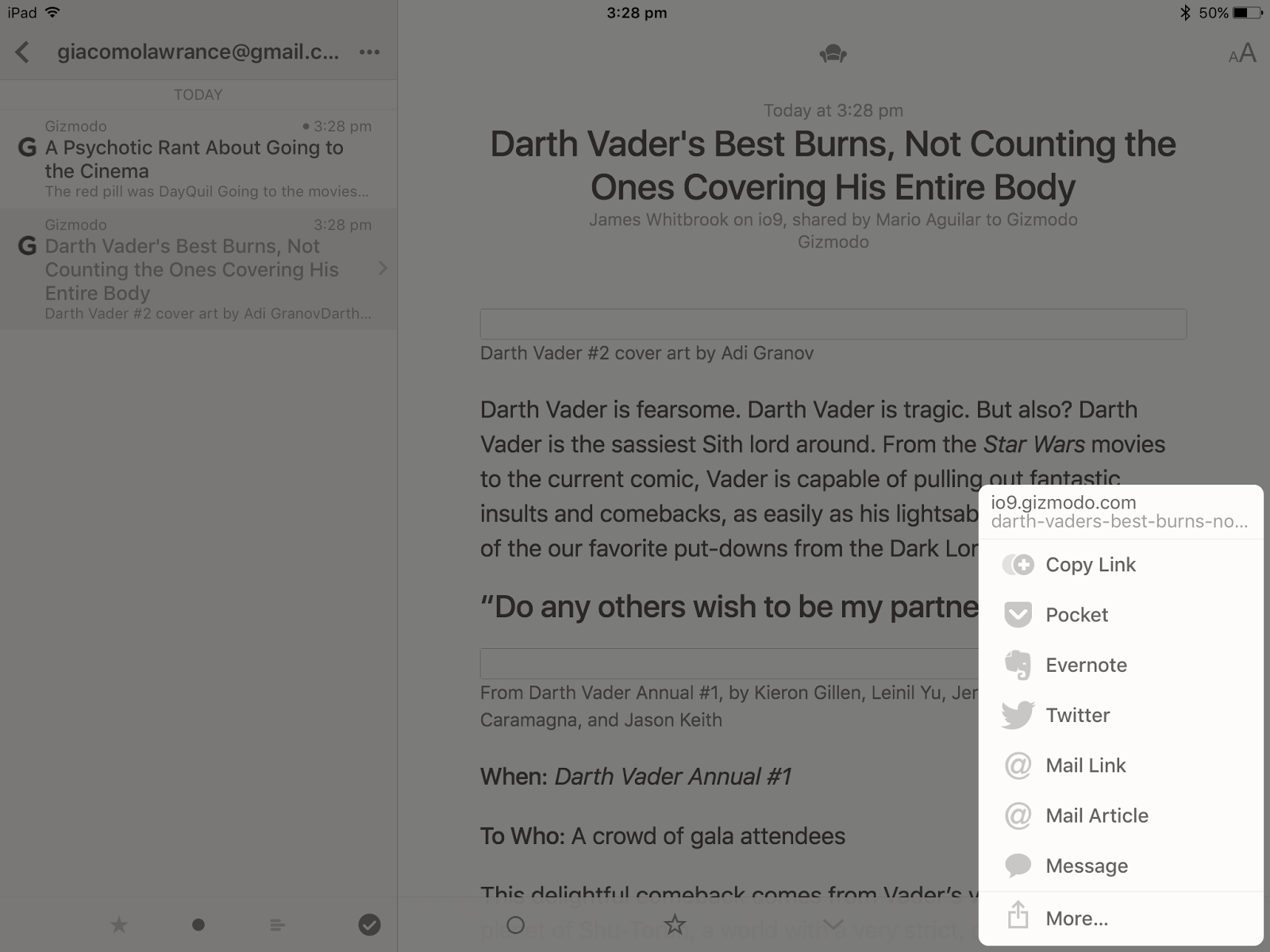
To share an article, simple tap on the sharing icon in the bottom right of article view; then tap on the service you want to share it to. You have to log in the first time you use that service, but you only need to do it once. When you share an article, a small box shows at the top of article view with the service you shared it to. This is a confirmation that you saved the article to that service. I also like the way that it does not obstruct the article, and it is very unobtrusive. I like to switch off the services I don’t use, as I find this cleans the sharing menu up a bit. You can do this by tapping on the cog at the top left of the accounts page. Saved articles come out great, looking like they did in the app.
Reeder is a great app, and I recommend that you try it out. The £3.99 is worth it, and you will be glad you did.

You can find the website here.

Thanks for reading!

Feel free to comment below!

Get Articuno, Zapdos, and Moltres via the Pokémon newsletter!

A chance to get Articuno, Zapdos, and Moltres has come!

To get these Pokémon, make sure you subscribe to the Pokémon newsletter to get Articuno, Zapdos and Moltres. To do this, you have to sign up an account with the Pokémon Trainer Club. You can find the link here. Make sure you do it before April 22, 2016, when the giveaway finishes.
The codes will come to you in the Pokémon newsletter in May.
You can read the article on the official Pokémon site here.
Thanks for reading!
Feel free to comment below!

Panel Tabs: Put Your Chrome Tabs into Floating Panels

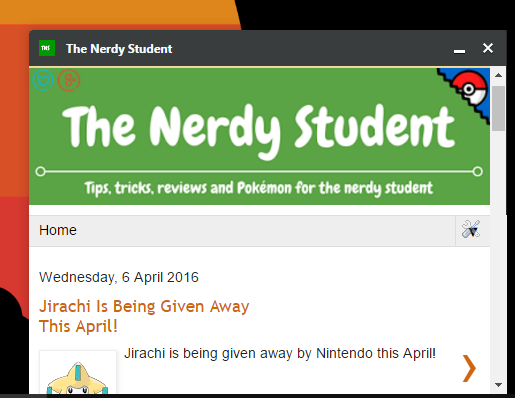
Panel Tabs is a great free Chrome extension which allows you to place your tabs into a separate floating panel.

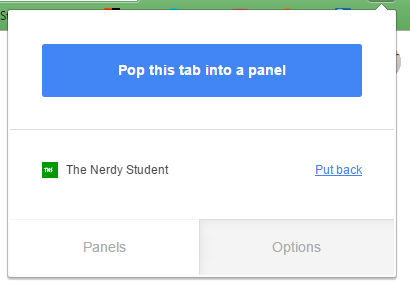
Panel Tabs is simple and easy to use; simple click on the Panel Tabs icon when you are on the tab you want to float, and then click ‘Pop this tab into a panel’.

The tab you had open will go into a floating window. You can minimize the tab, close it and put it back into a new tab on Chrome.

To put it back into Chrome, simply click on the Panel Tabs extension and then click ‘Put back’. The tab you had in a floating windows will go back into Chrome.

You can have more then 1 tab in a floating panel (all the tabs go into a separate floating panel), but I have not tested the limits of the amount of tabs you are allowed.

Panel Tabs is great when you want to take notes on a Youtube video, or when your are referring to an article. It’s also great if you want your social media in a separate window.

Thanks for reading!

Feel free to comment below!
Jirachi Is Being Given Away This April!

Jirachi is being given away by Nintendo this April!

You can get Jirachi via the Nintendo Network. It is available from the 1st of April until the 24th of April.

You can read more here.

Thanks for reading!

Feel free to comment below!
No posts on Wednesday 30 March and Saturday 2 April

There will be no posts on Wednesday 30 March and Saturday 2 April as I am away and will not be able to produce content of a high standard. I apologise to all you readers, and thanks for reading!

Pokémon Item in the Spotlight: Metal Coat!

The Metal Coat is an item that can increase move power and can evolve your Pokémon.

The Metal Coat can boost your steel type moves by 10%. If you trade Onix or Scyther, you can evolve them to Steelix or Scizor. The item means that you can make attacks more powerful, and it can make your Pokémon evolve.

Thanks for reading!

Please feel free to comment below!

Snapentry: Quickly Make Notes in Evernote

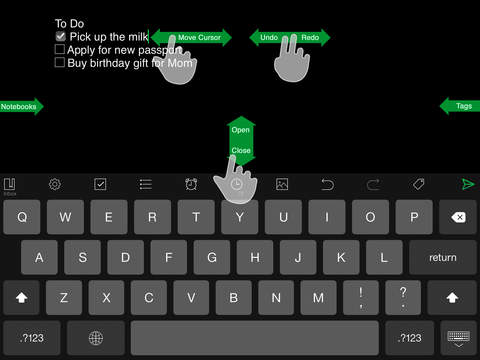
Snapentry is an app for iOS which allows you to make notes in Evernote with two – or even one tap.

Snapentry is an app which costs £2.99 in the Appstore.

Snapentry allows you to quickly enter your thoughts into Evernote, without having to wait for the Evernote app to load. This means that you will not forget your ideas, or you may want to get them down quickly.

Snapentry has many features, such as allowing you to insert pictures and allowing you to queue notes when your offline. You can see all the features on the app’s Appstore page.

One of my favorite features of the app is the option to allow ‘Auto send’. What happens here is that when the home button is pressed, the app automatically sends the note. This means that you don’t have to press the send button, and takes away a tap and makes the process of using the app slicker.

All in all, Snapentry is a pretty cool app, and if your sick of waiting for Evernote to load up, I suggest you look into it.

If you don’t want to dish out £2.99, you can always try Do Note by IFTTT. If you decide to get Do Note, use this recipe to get your notes into Evernote. However, Do Notes does not have the advanced features that Snapentry has. You can only enter plain text notes with Snapentry, and they cannot be tagged or moved to a different notebook in app.

Thanks for reading!

Feel free to comment below!

Celebi Being Given Out: Pokémon 20th Anniversary

Celebi is being given away!

You can get Celebi via the Nintendo Network. The giveaway expires on March 24th.

You can find out more here.

Thanks for reading!

Feel free to comment below!

JETech iPad Sleeve Review

A great sleeve for iPads and other tablets measuring 11.3 inches. With memory foam interior, it will protect your device against knocks and bumps.

The JETech sleeve fits my iPad Air 2 with a Logitech Ultrathin keyboard and stylus perfectly. It has a memory foam interior, and is made of good sturdy cloth.
The memory foam interior is orange, and forms around your device. It’s also fun to squish when your bored (Spanish lessons). The black and orange makes it look cool, and it also has space to put a stylus or cable in.
You can buy it here for $14.99.
Thanks for reading!
Feel free to comment below!
Mew Giveaway!

Win a Level 100 Mew!

Hello there everyone! To celebrate 20 Years of Pokémon and 100 posts on The Nerdy Student, I am giving away a Mew! Mew is only for ORAS and X&Y games.
All you need to do is sign up to The Nerdy Student email subscription, and then fill out the form with the same email that you subscribed with. If you use different email addresses, you will not win! You can subscribe below:

Enter your email address to subscribe to The Nerdy Student

Then you need to fill in the form below:

And then your done! Make sure you have filled the form and the subscription with the same email address. If you have any problems you can contact me here. Good luck!

Competition closed on the 31st of March, and the winner will be emailed on the 1st of April with a confirmation email. This email must be replied to within 12 hours or another winner will be chosen!

Thanks for reading and taking part!

Feel free to comment below!

Advertisement